
Dual SIM in Vietnam: How to Use Your Home SIM and a Vietnam eSIM the Right Way
The best dual-SIM setup for most travelers in Vietnam is simple: keep your home SIM active for OTP and important accounts, and use a Vietnam eSIM for mobile data.
That is the setup most people actually want. It lets you stay reachable on your original number while using cheaper, faster local data for maps, ride apps, browsing, and daily travel. The problem is not whether dual SIM works in Vietnam. It does. The real issue is setting the right line for the right job.
Quick answer: Use your home SIM for OTP, banking, and existing accounts. Use your Vietnam eSIM for mobile data and local travel apps. Most dual-SIM problems happen when the phone is using the wrong line for data or when the home SIM is no longer reachable.
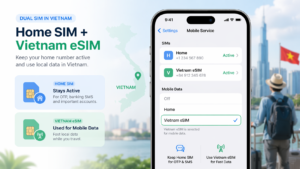
What dual SIM actually means for travelers in Vietnam
Dual SIM means your phone can keep two lines available at the same time.
That can be:
- one physical SIM + one eSIM
- two eSIMs on supported phones
- two physical SIMs on some region-specific devices
Apple, Samsung, and Google all support dual-SIM use on many recent devices, but the exact combination still depends on the phone model, country version, and carrier support. :contentReference[oaicite:1]{index=1}
The most practical dual-SIM setup in Vietnam
For most travelers, the cleanest setup is not using both lines for everything.
| Function | Best line to use | Why |
|---|---|---|
| Banking OTP | Home SIM | Existing accounts usually keep sending OTP to the original number |
| Maps, browsing, social apps | Vietnam eSIM | Local data is usually more practical than roaming |
| Grab and local app setup | Often Vietnam line | A local number can be easier for local services |
| Regular calls back home | Home SIM or app-based calling | Depends on roaming cost and your carrier plan |
This is why a Vietnam eSIM works best as your data line, while your original SIM stays active for the accounts that already depend on it.
Why travelers use dual SIM in Vietnam
Dual SIM solves two real travel problems at once.
- You avoid relying only on expensive roaming.
- You do not lose access to your original number.
That matters because many travelers still need their home number for account recovery, security checks, and banking messages. At the same time, they want local mobile data that works easily after landing.
How to set up dual SIM the right way
The goal is not just to install the second SIM. The goal is to assign the right line to the right function.
- Install your Vietnam SIM or eSIM
- Label the two lines clearly, such as “Home” and “Vietnam”
- Set the Vietnam line for mobile data
- Keep the home line active if it still needs to receive OTP or important messages
- Double-check which line your phone is using for calls, SMS, and data
This is where many travelers make mistakes. They install the eSIM successfully, see that internet works, and assume the whole setup is finished. Later, OTP does not arrive because the phone is looking fine for data but the wrong line is active for the number that should receive the message.
What changes by device
The logic is the same across iPhone, Samsung, and Pixel, but the menu names differ.
iPhone
Apple supports Dual SIM with one physical SIM and one eSIM, and many newer iPhones also support two eSIMs. :contentReference[oaicite:2]{index=2}
Samsung Galaxy
Samsung uses SIM Manager and notes that eSIM availability can vary by model, carrier, and country. :contentReference[oaicite:3]{index=3}
Google Pixel
Google describes Pixel dual SIM as DSDS, where you choose which SIM handles each action. :contentReference[oaicite:4]{index=4}
The most common dual-SIM mistakes in Vietnam
Most dual-SIM problems are settings problems, not network failures.
- The wrong line is still selected for mobile data
- The home SIM is turned off even though it still needs to receive OTP
- The traveler assumes the data line is also the OTP line
- The two lines were never labeled clearly, so the wrong one gets selected later
This is also why dual-SIM confusion often shows up as an OTP problem rather than a connection problem. Internet works, but the code still does not arrive.
What to check if dual SIM is causing problems
If something feels wrong, go back to the basics instead of reinstalling everything immediately.
- Which number should receive OTP?
- Is that SIM still active and reachable?
- Which line is currently set for mobile data?
- Which line is set for calls and SMS?
If your main issue is verification codes, the deeper guide on Vietnam eSIM and OTP explains the broader logic, and the separate article on dual-SIM OTP problems in Vietnam covers that exact situation in more detail.
Image suggestion: Insert a clean settings-style image here showing a phone with two labeled lines, such as “Home” and “Vietnam”, and the local eSIM selected for mobile data.
When a Vietnam eSIM makes the most sense
A Vietnam eSIM is the easiest fit when you mainly want local data without losing your home number.
That is the most common travel use case. If your trip includes remote or mountain routes, a Viettel eSIM is usually the better fit for broader coverage. If your trip is more general and you just want a simple local data option, a standard Vietnam eSIM is usually enough.
FAQ
What is the best dual-SIM setup for travel in Vietnam?
For most travelers, the best setup is to keep the home SIM active for OTP and important accounts, and use a Vietnam eSIM for mobile data.
Can I use my home SIM and a Vietnam eSIM at the same time?
Yes, on many modern iPhones, Samsung Galaxy phones, and Google Pixel devices, as long as the model and carrier support the required SIM combination. :contentReference[oaicite:5]{index=5}
Does the data SIM always receive OTP?
No. OTP goes to the number registered with the service, not automatically to the line currently used for mobile data.
Why does dual SIM cause confusion?
Because one line can provide data while the other line is still the number tied to banking, security, or account verification.
Is dual SIM good for Vietnam travel?
Yes. It is one of the most practical ways to stay connected locally while keeping your original number active.