
Carrier Locked Phone eSIM Problems in Vietnam
If your Vietnam eSIM does not work, one of the most common reasons is that the phone is locked to a carrier.
This is a very common support case for travelers. The eSIM installs or scans normally, but the phone still cannot use the Vietnam network properly. In many of these cases, the real problem is not the eSIM at all. The phone was bought under a carrier agreement and is still restricted to that original network.
Quick answer: If your phone is carrier-locked, changing APN or reinstalling the eSIM usually will not solve it. In most cases, only the original carrier can unlock the device.
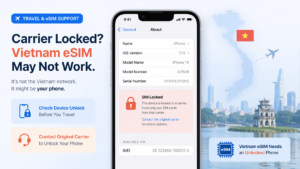
What this problem usually means
Most travelers describing a “4G/5G lock” issue are actually dealing with a carrier lock, not a simple network setting.
That means the phone may only accept service from the original provider, or may behave poorly when you try to use a different SIM or eSIM abroad. This often happens with devices bought on installment, under a contract, or through a carrier promotion that required using that network for a certain period.
A GoVnSIM situation we see often
The traveler buys or installs a Vietnam eSIM, but the phone still refuses to connect normally.
Sometimes the device was bought through a carrier such as AT&T, Verizon, or another operator with a required service period. The customer assumes the eSIM itself is faulty, but the real issue is that the phone is still locked to the original network. In that situation, support can help verify the symptoms, but the actual unlock usually has to come from the carrier that sold the phone.
Why carrier lock matters more than many travelers expect
A locked phone can block the whole setup before Vietnam coverage even becomes the real issue.
If the device is locked, a local Vietnam eSIM may fail to activate properly, may not register on the network, or may behave like the phone simply does not support the service. That is why this is one of the first things worth checking before spending time on APN or other advanced settings.
| Situation | What it often means | Most realistic next step |
|---|---|---|
| eSIM scans but phone will not connect | Possible carrier lock | Check unlock status first |
| Phone was bought on contract or installment | May still be tied to the original carrier | Contact that carrier |
| Phone works only with one original network | SIM lock is likely still active | Request official unlock |
How to check if your phone is unlocked
The exact method depends on the device.
iPhone
Apple says you can check this in Settings → General → About → Carrier Lock. If it shows “No SIM restrictions”, the iPhone is unlocked. :contentReference[oaicite:1]{index=1}
Pixel
Google says a SIM-unlocked Pixel can be used with any mobile service provider, and phones bought from the Google Store come unlocked. :contentReference[oaicite:2]{index=2}
Samsung and other Android phones
Samsung notes that eSIM availability can vary by model, country, and carrier, so support can differ even when the device family itself supports eSIM. That is why it is safer to check the phone settings and the original carrier status before assuming a Vietnam eSIM will work. :contentReference[oaicite:3]{index=3}
Why this happens with AT&T and similar carriers
Some phones are sold under a service commitment, installment plan, or carrier-specific policy.
AT&T’s official unlock rules say the device generally must be more than 60 days old and paid in full before it can be unlocked, among other requirements. AT&T also states that if a device is not supported by its unlock solutions, the user needs to contact the original provider. :contentReference[oaicite:4]{index=4}
That is exactly why GoVnSIM often has to tell customers the same thing: if the phone is locked, the real fix usually starts with the original carrier, not with the Vietnam eSIM itself.
What usually does not solve the problem
If the phone is carrier-locked, these steps usually do not fix the root cause:
- reinstalling the eSIM repeatedly
- changing APN settings first
- switching between 4G and 5G modes
- blaming Vietnam coverage immediately
Those steps may help in other situations, but they do not remove a carrier lock.
What the most realistic fix looks like
In most cases, the realistic path is to contact the original carrier and request an official unlock.
That may involve meeting the carrier’s eligibility rules first, such as finishing payments or waiting out the required service period. Support from an eSIM seller can help identify the problem, but it normally cannot remove the carrier restriction itself. :contentReference[oaicite:5]{index=5}
The best advice before buying a phone or installing eSIM
Check whether the phone is unlocked before you buy it, and check again before you install a travel eSIM.
This is the safest way to avoid last-minute problems before a trip to Vietnam. A phone that looks modern and supports eSIM on paper may still be restricted by the carrier that sold it. That is why “supports eSIM” and “is unlocked for Vietnam eSIM use” are not always the same thing.
A better setup for Vietnam travel
If your device is confirmed unlocked, setting up a Vietnam eSIM before arrival is usually the easiest path.
If your trip includes remote routes or mountain areas, a Viettel eSIM is usually the better fit for stronger coverage outside the main city core.
FAQ
Why does my Vietnam eSIM not work on a carrier-locked phone?
Because a carrier-locked device may only accept the original provider’s network, which can block normal use of a Vietnam eSIM.
Can GoVnSIM unlock my phone?
No. In most cases, only the original carrier can officially unlock the device.
How do I check if my iPhone is unlocked?
Apple says to go to Settings, General, About, and check Carrier Lock. If it says “No SIM restrictions,” the iPhone is unlocked. :contentReference[oaicite:6]{index=6}
Do phones bought from Google Store come unlocked?
Google says phones bought from the Google Store come unlocked. :contentReference[oaicite:7]{index=7}
What is the best way to avoid this problem before a Vietnam trip?
Check that the phone is unlocked before buying it and before installing your eSIM. That is usually the cleanest way to avoid travel-day connection problems.