
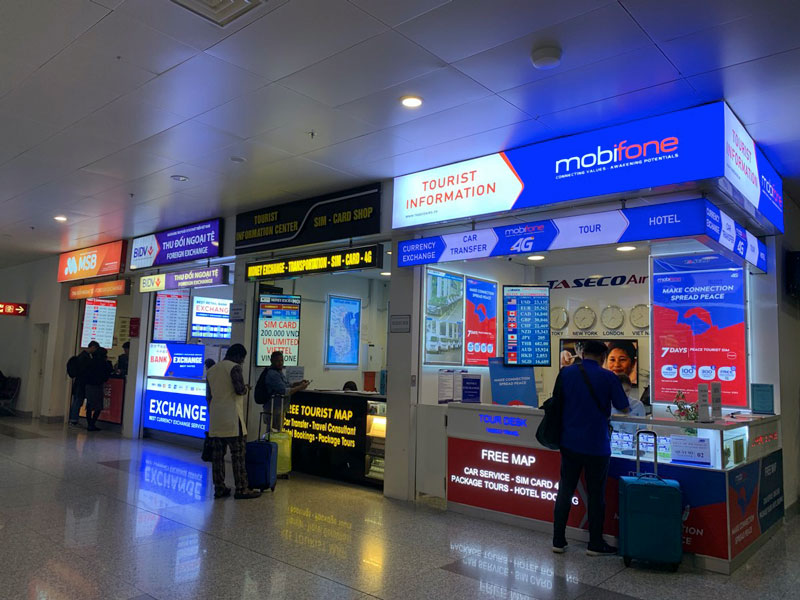
How to Buy a SIM Card at Hanoi Airport (Noi Bai) – Step-by-Step
Buying a SIM at Noi Bai Airport is simple, but the experience depends on timing. This guide focuses on the exact steps, what to prepare, and what to check before you walk away from the counter.
Quick answer (30 seconds)
- Where: Arrivals hall after baggage claim (International T2), near the exit doors.
- What you need: Passport + unlocked phone.
- How long: 5–10 minutes when quiet; longer when multiple flights land.
- What to expect: Mostly fixed tourist bundles; airport packages are often not the highest-data options.
Want to skip the SIM counter? Many travelers set up a Vietnam eSIM before flying so mobile data is ready right after landing. Check Vietnam eSIM plans you can activate in advance.
Before you buy (don’t skip)
- Confirm your phone is unlocked (not carrier-locked).
- Bring your passport (SIM registration is required).
- Decide your need: data only vs data + Vietnamese number.
- Keep a safe place for your home SIM (small envelope or SIM tray case).
Step-by-step: how to buy at the airport
Step 1: Find the right counter
After baggage claim, walk into the arrivals hall. SIM counters are usually positioned before the exit doors. You may see carrier counters (Viettel / MobiFone / VinaPhone) and independent tourist SIM kiosks.
Step 2: Ask these 3 questions (fast and practical)
- How much high-speed data per day? (Ask for the daily cap.)
- How many days is it valid? (7 / 15 / 30 days are common.)
- Does it include a Vietnamese phone number? (If you need calls/SMS.)
Airport reality check: Many airport offers are standard tourist bundles. If you want a specific plan or higher daily data, preparing your eSIM in advance gives you more control.
Step 3: Registration + installation
Hand over your passport. Staff will register the SIM, install it, and activate it on the spot.
Step 4: Don’t pay until you complete this 60-second test
- Open a website (not just Wi-Fi).
- Open Google Maps and load your location.
- Send a message on WhatsApp/Telegram.
- Confirm the SIM is the active data line (mobile data ON).
Step 5: Pay and take a photo of the package details
Before leaving, take a quick photo of the package name, validity period, and any usage notes (daily cap / speed reduction terms).
Waiting time (what causes queues)
When several international flights arrive close together, SIM counters can get crowded and waiting time increases.
If you’re landing tired or arriving at peak hours: setting up your eSIM before the flight can help you go straight out instead of queueing. See Vietnam eSIM options.
Physical SIM vs eSIM at Hanoi Airport
Physical SIM (most common at the airport)
- Installed by staff
- Usually includes a Vietnamese number
- No need to check eSIM compatibility
eSIM (less common at the counter)
Vietnam supports eSIM, but airport counters typically promote physical SIM first. Some official counters may support eSIM, but availability and staff familiarity can vary.
Troubleshooting (2 quick fixes at the counter)
If you see signal but no internet
- Ask staff to check the APN.
- Toggle airplane mode ON → OFF once.
If the SIM doesn’t activate
- Ask them to re-seat the SIM and recheck mobile data settings.
- Confirm your phone is unlocked.